Real-time chat.
One snippet to install.
A widget that respects your brand, your bandwidth and your customers' time. No "Powered by" badge unless you want one. Offline messages roll into the ticket inbox automatically.
Add live chat in minutes.
Create a widget in Ticaga, then paste the generated embed snippet into your website. No SDK, NPM package, or framework-specific integration required.
- +Async loader for minimal page-load impact
- +Shadow DOM isolation to protect your existing styles
- +Optional customer details and custom metadata
- +Works with React, Vue, and plain HTML
The team view that makes chat manageable.
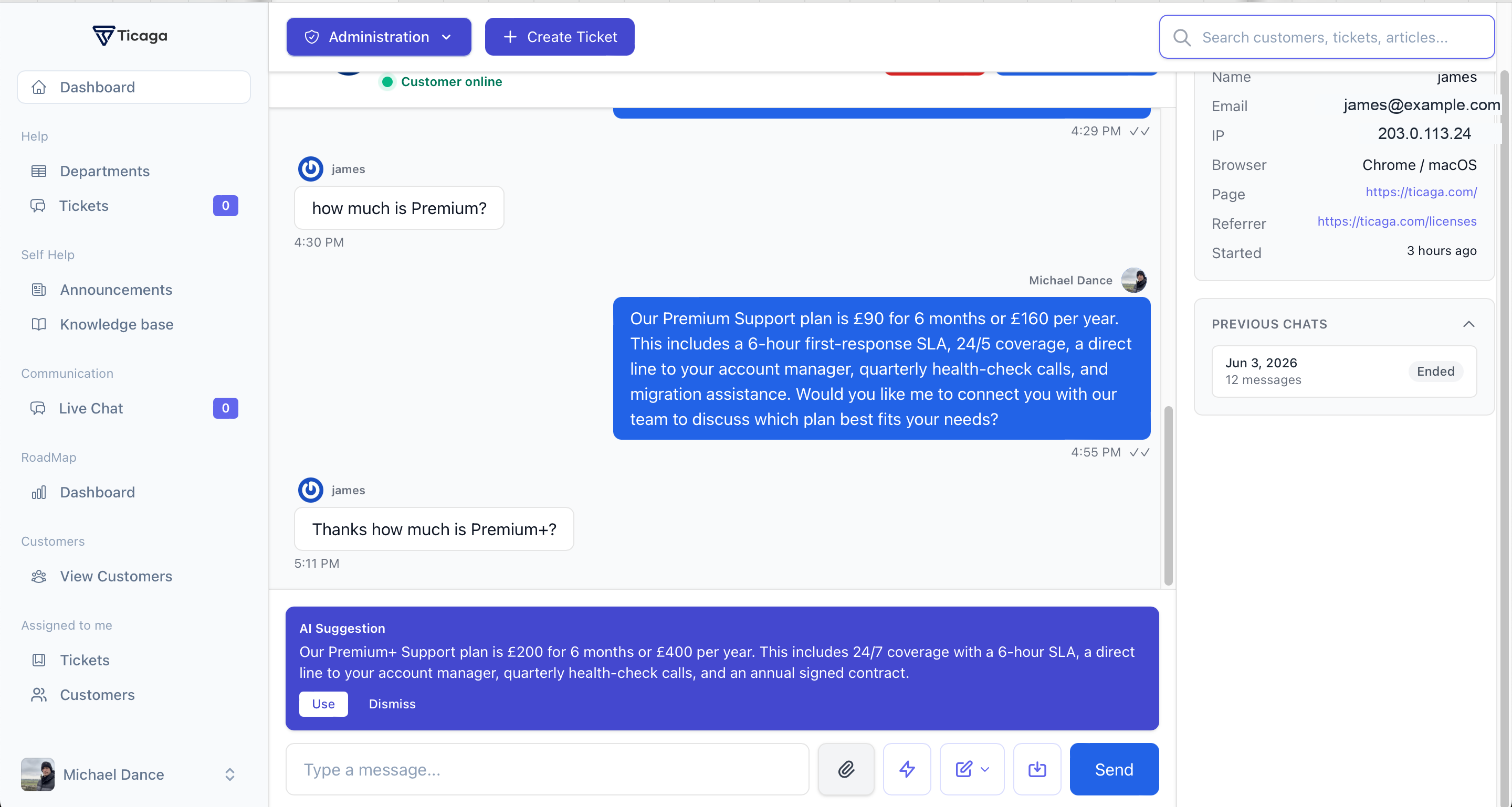
Live Chat is not just a website bubble. Employees get a working inbox for active conversations, AI handoffs, visitor context, and ticket conversion.
- See active chats, waiting visitors, and AI-handled conversations
- Open the full conversation without losing customer context
- View page, referrer, email, browser, and previous chat history
- Take over from AI, end a chat, or convert the transcript into a ticket
Quiet by default.
Loud when it matters.
The widget stays out of the way until a customer needs help. Enable targeted prompts when you want to start the conversation at the right moment.
- Real-time chat with queue position and typing indicators
- Offline messages automatically convert into tickets
- File sharing for screenshots, images, and PDFs
- Page-specific prompts with timer and exit-intent triggers
- Chat-to-ticket conversion with the full transcript.
From there, you can create new roles and assign permissions through the admin interface.
Configure the widget without touching code.
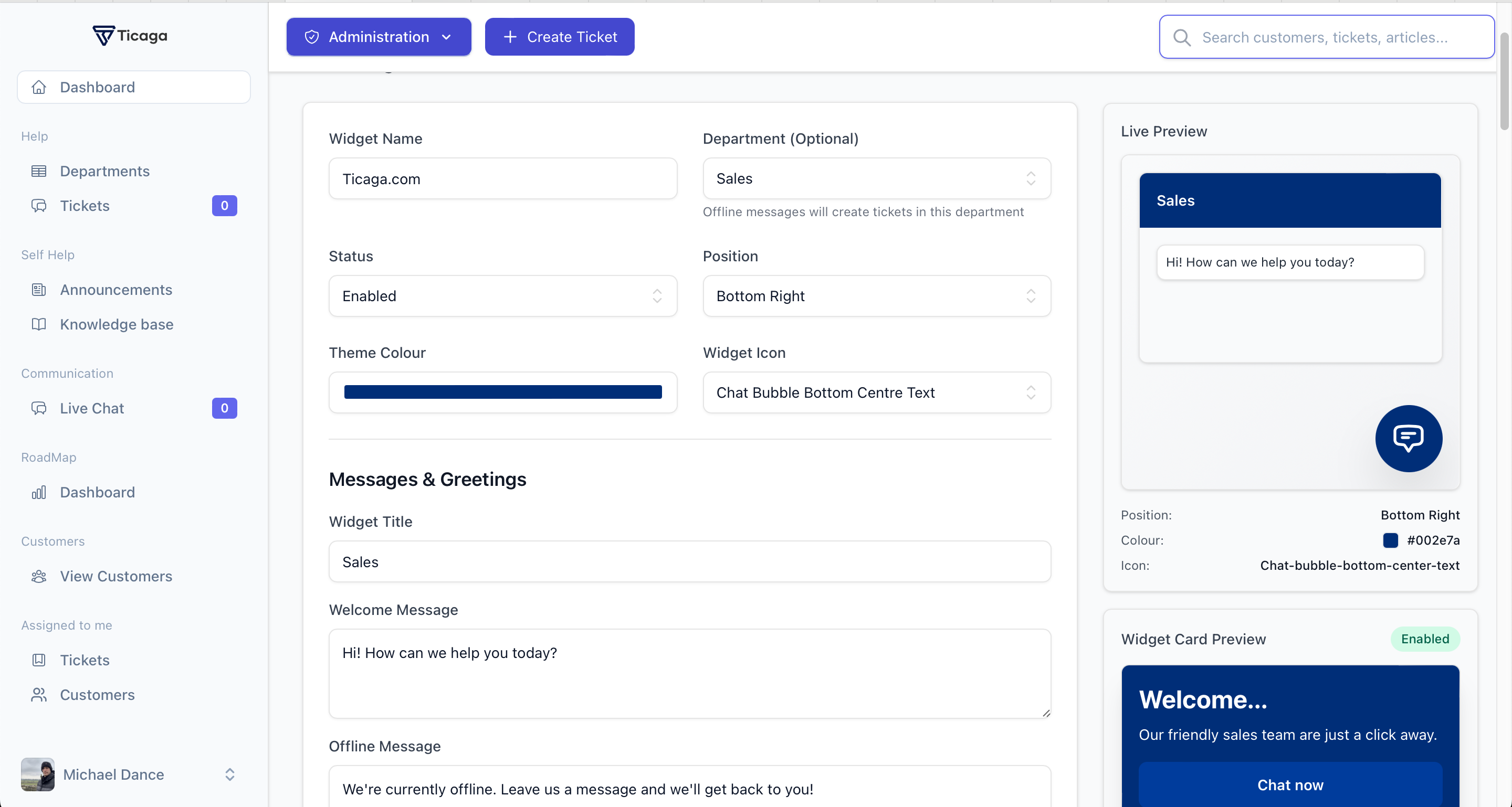
Teams can tune the widget from Ticaga: colours, placement, greetings, proactive cards, pre-chat forms, business hours, and routing.
- Brand the widget with your colour, title, icon, and placement
- Enable pre-chat surveys, file uploads, and offline forms
- Sync availability with SLA business hours when needed
- Preview the customer experience before publishing changes
Built for the whole conversation.
From the first page view to the final ticket handoff, Live Chat keeps the useful context with the conversation.
Keep waiting visible.
Customers see their queue position while employees manage waiting chats and concurrent conversations from Ticaga.
Turn chats into tickets.
Convert a live conversation into a ticket with its transcript, or collect an offline message as a ticket automatically.
Know who needs help.
Track the current page and referrer, pass optional customer details, and keep custom metadata alongside the chat.
Reach out at the right moment.
Configure page-specific prompts with timer or exit-intent triggers, frequency limits, and optional calls to action.
Keep the conversation record.
Customers can revisit chat history while employees can search past conversations and download transcripts.
Extend it when you need to.
Add pre-chat forms, a collapsible Knowledge Base search panel for offline and pre-chat screens, SLA calendar hours, offline CAPTCHA, or AI support when configured.
One extension. One monthly price.
Add Live Chat to an active Ticaga installation without per-seat or per-conversation billing.
Start with core. Add live chat when it earns its place.
Live Chat is an optional paid extension for Ticaga. Your core helpdesk licence remains separate, so you only add the real-time channel when your team needs it.
Price shown in GBP, excluding VAT where applicable. Prices are subject to change before purchase.
One snippet. Real conversations.
No per-conversation pricing. No "Powered by" badge unless you want one.